

prefect-dbt API as it existed in 0.6.6 and earlier — DbtCoreOperation, DbtCliProfile, the TargetConfigs hierarchy, and the pre-built trigger_dbt_cli_command / dbt_build_task tasks. These APIs still work in modern releases, but for new projects prefer PrefectDbtRunner, which provides better logging, asset lineage, and failure handling.
Before creating blocks for the first time, register
prefect-dbt’s block types:prefect-dbt supports a couple of ways to run dbt Core commands.
A DbtCoreOperation block will run the commands as shell commands, while other tasks use dbt’s Programmatic Invocation.
Optionally, specify the project_dir.
If profiles_dir is not set, the DBT_PROFILES_DIR environment variable will be used.
If DBT_PROFILES_DIR is not set, the default directory will be used $HOME/.dbt/.
Use an existing profile
If you have an existing dbtprofiles.yml file, specify the profiles_dir where the file is located:
profiles.yml with a DbtCliProfile block.
Use environment variables with Prefect secret blocks
If you use environment variables inprofiles.yml, set a Prefect Secret block as an environment variable:
profiles.yml file could then access that variable.
Create a new profiles.yml file with blocks
If you don’t have a profiles.yml file, you can use a DbtCliProfile block to create profiles.yml.
Then, specify profiles_dir where profiles.yml will be written.
Here’s example code with placeholders:
TargetConfigs blocks.
If the desired service profile is not available, you can build one from the generic TargetConfigs class.
Programmatic Invocation
prefect-dbt has some pre-built tasks that use dbt’s programmatic invocation.
For example:
Create a summary artifact
These pre-built tasks can also create artifacts. These artifacts have extra information about dbt Core runs, such as messages and compiled code for nodes that fail or have errors.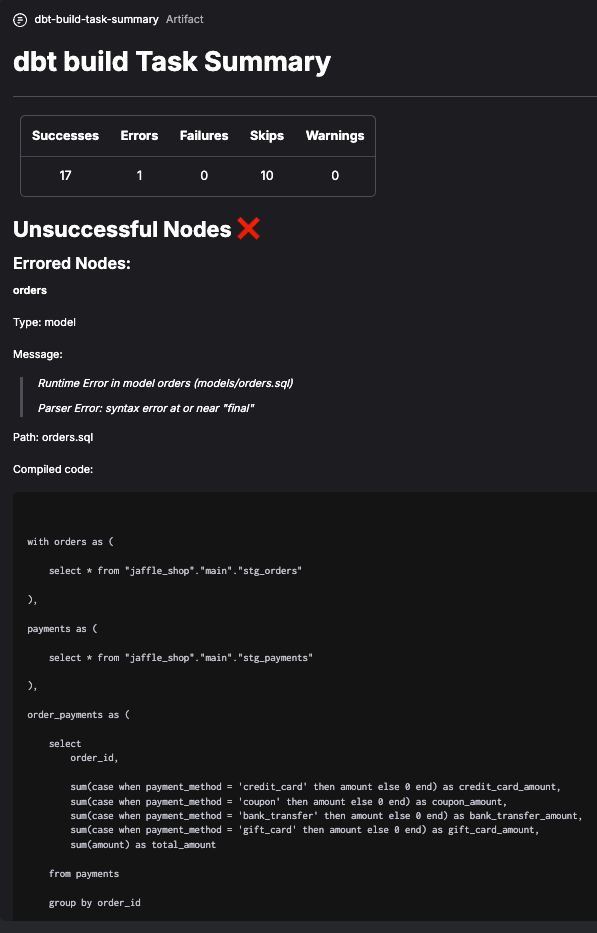
BigQuery CLI profile block example
To create dbt Core target config and profile blocks for BigQuery:- Save and load a
GcpCredentialsblock. - Determine the schema / dataset you want to use in BigQuery.
- Create a short script, replacing the placeholders.
- Determine the dbt commands you want to run.
- Create a short script, replacing the placeholders.
DbtCoreOperation block to reuse it in a flow: